API Access
API Access lets your own systems read conversation and analytics data from Chatislav using an API key. Use it when you want to sync conversations into another tool, build internal reports, or pull analytics into your own dashboard.
The public API uses the chatislav_v1 response format.
Before You Start
You need:
- API Access enabled for your workspace.
- A Chatislav account with access to the workspace.
- The bot ID of the AI agent you want to query.
- An active API key from the External API tab.
API keys are client-level keys. A key can access data for bots that belong to the same workspace.
Create an API Key
- Open your profile menu.
- Go to Profile.
- Open the External API tab.
- Click Generate key.
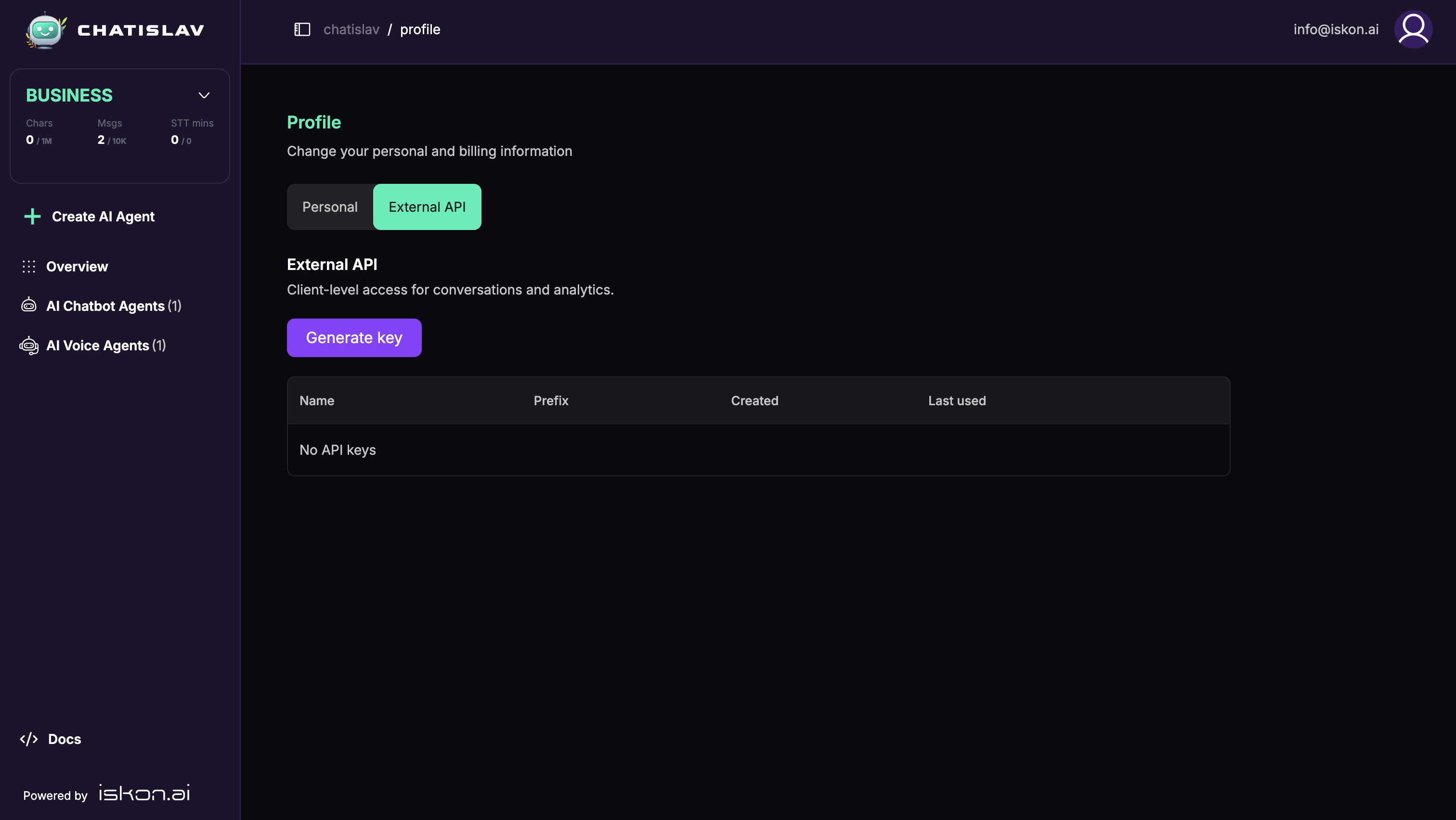
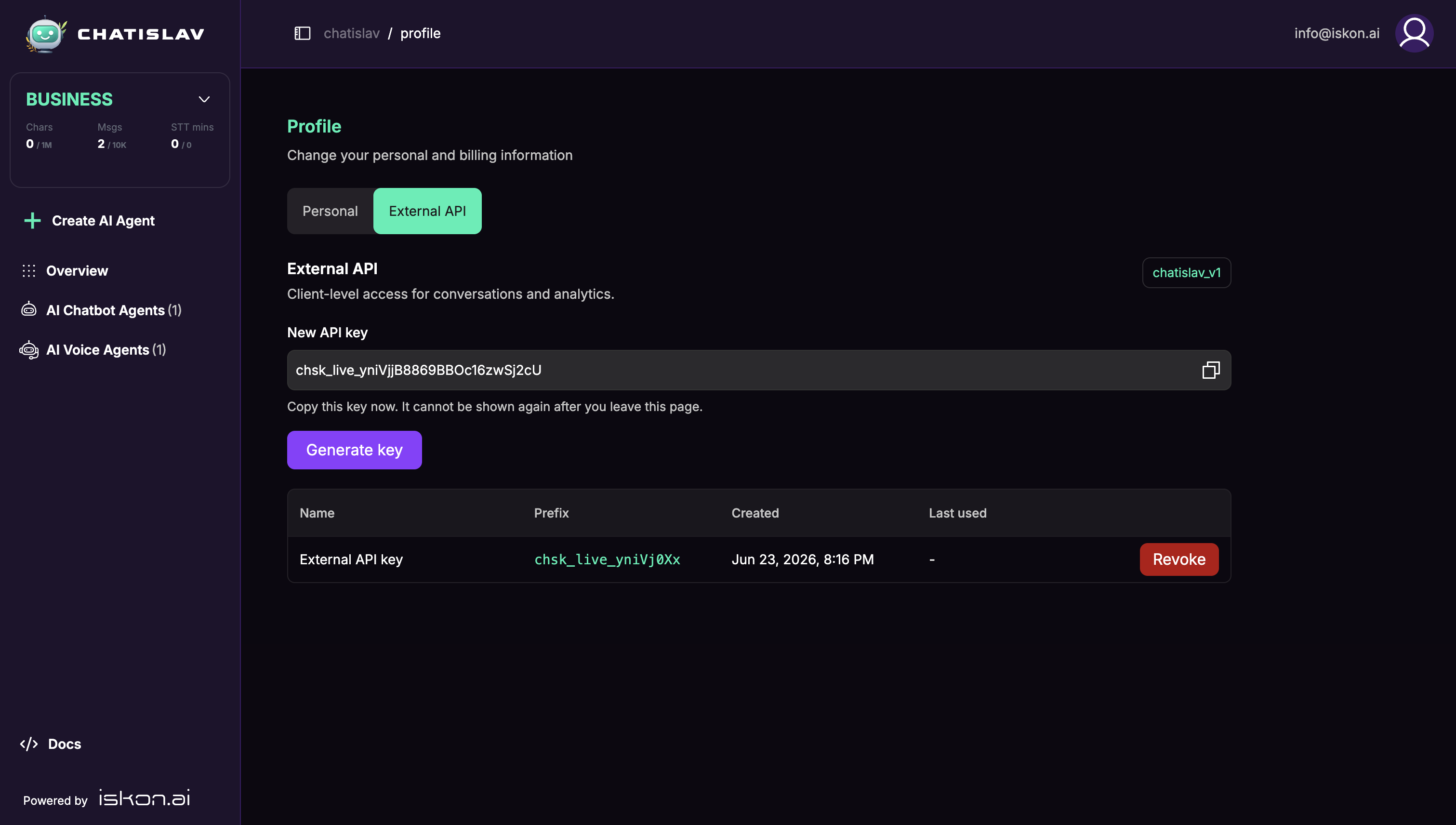
After generating a key, copy it immediately. Chatislav only shows the full key once. Later, the table only shows the key prefix, created date, last used date, and Revoke button.
Authentication
Send the API key in the X-API-Key header.
curl https://platform.chatislav.ai/api/v1/conversations \
  -H "Content-Type: application/json" \
  -H "X-API-Key: chsk_live_your_key_here" \
  -d '{"bot_id": 123, "limit": 10}'
If the key is missing, invalid, revoked, or API Access is disabled for the workspace, the request is rejected.
Base URL
https://platform.chatislav.ai/api/v1
Available endpoints:
| Endpoint | Method | Description |
|---|---|---|
/conversations | POST | Search and export conversations with messages. |
/analytics | POST | Read analytics totals for conversations, usage, resolutions, and voice data. |
Conversations Endpoint
Use /conversations to retrieve conversation records and their messages.
curl https://platform.chatislav.ai/api/v1/conversations \
  -H "Content-Type: application/json" \
  -H "X-API-Key: chsk_live_your_key_here" \
  -d '{
    "bot_id": 123,
    "from": "2026-06-01T00:00:00Z",
    "to": "2026-06-23T23:59:59Z",
    "channel": "all",
    "resolution_status": "all",
    "limit": 50
  }'
from and to are UTC.
Request Fields
| Field | Type | Description |
|---|---|---|
bot_id | number | Required. The AI agent ID. |
session_id | string | Optional. Return one conversation by session ID. |
from | string | Optional. UTC start date/time. |
to | string | Optional. UTC end date/time. |
q | string | Optional. Search message content. Maximum 200 characters. |
channel | string | Optional. all, widget, whatsapp, viber, instagram, facebook, or telegram. Default is all. |
resolution_status | string | Optional. all, resolved, or unresolved. Default is all. |
human_takeover | boolean | Optional. Filter by human takeover state. |
guardrail_flagged | boolean | Optional. Filter conversations with or without guardrail events. |
limit | number | Optional. Number of conversations to return, from 1 to 100. Default is 50. |
cursor | string | Optional. Use the previous response's nextCursor to request the next page. |
Response Shape
{
  "conversations": [
    {
      "sessionId": "0c7c7f87-2b62-4f20-9f8d-9a8f6a6f7a11",
      "botId": 123,
      "companyId": "123",
      "createdAt": "2026-06-23T10:15:00",
      "lastActivity": "2026-06-23T10:17:20",
      "channel": "widget",
      "resolutionStatus": "resolved",
      "humanTakeover": false,
      "helpful": 1,
      "feedbackComment": "Helpful answer",
      "summary": {
        "sentiment": "positive",
        "resolution_status": "resolved"
      },
      "userForm": [],
      "contact": {
        "ipAddress": "203.0.113.10",
        "phoneNumber": null
      },
      "messages": [
        {
          "id": "f2df1bb8-884b-4412-b058-57a3b64bd232",
          "createdAt": "2026-06-23T10:15:00",
          "role": "user",
          "content": "Hi, can you help?"
        }
      ]
    }
  ],
  "pagination": {
    "limit": 50,
    "nextCursor": null,
    "hasMore": false
  }
}
When hasMore is true, send the returned nextCursor in the next request.
Analytics Endpoint
Use /analytics to retrieve analytics totals for the selected bot and date range.
curl https://platform.chatislav.ai/api/v1/analytics \
  -H "Content-Type: application/json" \
  -H "X-API-Key: chsk_live_your_key_here" \
  -d '{
    "bot_id": 123,
    "from": "2026-06-01T00:00:00Z",
    "to": "2026-06-23T23:59:59Z",
    "channel": "all"
  }'
from and to are UTC.
Request Fields
| Field | Type | Description |
|---|---|---|
bot_id | number | Required. The AI agent ID. |
from | string | Required. UTC start date/time. |
to | string | Required. UTC end date/time. |
channel | string | Optional. all, widget, whatsapp, facebook, instagram, viber, telegram, outlook, or zendesk. Default is all. |
Response Shape
{
  "schema": "chatislav_v1",
  "botId": 123,
  "companyId": "123",
  "agentId": "123",
  "from": "2026-06-01T00:00:00Z",
  "to": "2026-06-23T23:59:59Z",
  "analytics": {
    "isVoiceBot": false,
    "conversations": {
      "total": 25,
      "uniqueContacts": 18,
      "newUsers": 12,
      "returningUsers": 6,
      "leadCollectedUsers": 4,
      "totalMessages": 80,
      "assistantMessages": 40,
      "userMessages": 40,
      "starterQuestionTurns": 3,
      "humanTakeovers": 1,
      "avgMessagesPerConversation": 3.2,
      "medianDurationSeconds": 120,
      "toolAssistedConversations": 5,
      "guardrailInterventions": 0,
      "feedbackComments": 2
    },
    "resolutions": {
      "confirmed": 10,
      "assumed": 8,
      "unresolved": 3,
      "unclear": 4
    },
    "usage": {
      "totalCredits": 42.5,
      "messagesWithCreditUsage": 40,
      "mainLlm": 30,
      "agentRouter": 4,
      "agentInnerLoop": 3,
      "guardrails": 2,
      "conversationSummary": 1,
      "followupQuestions": 0,
      "starterQuestions": 0.5,
      "promptAssistant": 0,
      "imageFeatures": 0,
      "other": 2
    },
    "voice": null
  }
}
For voice agents, analytics.voice contains voice conversation and voice credit totals.
Key Management
- Store API keys securely. Treat them like passwords.
- Copy new keys immediately; the full key is shown only once.
- Revoke a key if it is no longer needed or may have been exposed.
- You can keep up to 5 active API keys. Revoke an existing key before creating another one when the limit is reached.